ETS 6.4 shows a nonexistent device in Programming Mode

Hi everyone,
I'm trying to commission a new MDT glass push-button in my KNX installation, but I've run into a strange issue with ETS.
Topology:
- Main line: 1.0 TP
- Subline: 1.1 TP
What happened:
I initially tried to commission the new MDT glass push-button with individual address 1.1.52. During the download, ETS displayed the following error:
The address of the device was successfully programmed but the final check of this procedure failed. Please check the topology. You may need to switch off the programming mode (LED) manually.
After several attempts, I disconnected the device from the KNX bus.
However, ETS still detects individual address 1.1.52 under Diagnostics → Individual Addresses → Programming Mode, with a hop count of 6.
The strange thing is:
- Programming Mode: 1.1.52 still appears.
- Individual Address Check: The device cannot be found.
- Line Scan: The device cannot be found either.
- Bus power cycle: I switched off the entire KNX bus and powered it back on, but the issue persists.
The original device is physically disconnected, and no device with address 1.1.52 should currently be responding on the bus.
Has anyone experienced this issue before?
Why does ETS continue to show 1.1.52 in Programming Mode when the address is not reachable through Individual Address Check or Line Scan?
Could this be an ETS diagnostic issue, a problem with the KNX interface, or something related to the failed download and programming-mode state?
Any advice on how to clear or further diagnose this would be greatly appreciated.
Thanks in advance!
-

Hi there
I've had this issue before when another device was in programming mode beforehand, and then I selected the new device for download without it being in programming mode. This then downloaded the new address to the existing device. I also got the topology warning, since the device that was in programming mode was on a different line than addressed.
What happens if you try to read out "Device Info" from the address? Does it show a different serial number? Can you gather which address it should have based on the linked group addresses and product type? You can then set the old individual address for that existing device.
You can then connect the new device again, and put it into programming mode, "Download" all, and all should be well. If it doesn't work, you can try to download by serial number.
You say you disconnected the KNX bus, but which line did you disconnect? Just the backbone, or just the subline. Or both?
0 -
Thank you all for your reply so far.
I’ll try to describe the topology in a bit more detail.
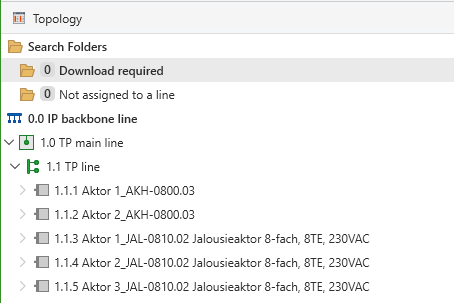
I have a main line (1.0 TP) with only one additional line connected to it, namely line 1.1, as shown in Screenshot 1. All devices are located on line 1.1.
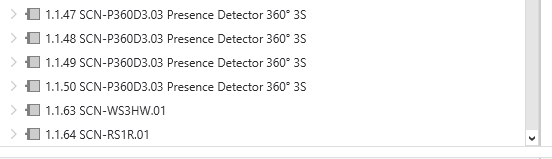
However, there is currently no device with the individual address 1.1.52 defined in the topology (see Screenshot 2).
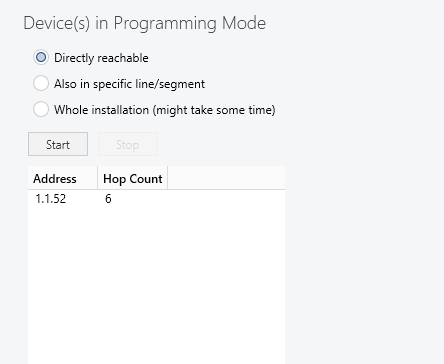
When I search for devices in programming mode in ETS, a device with the address 1.1.52 is still detected. This device is neither defined in ETS or the topology, nor is there actually any device with the address 1.1.52 connected to the bus (see Screenshot 3).
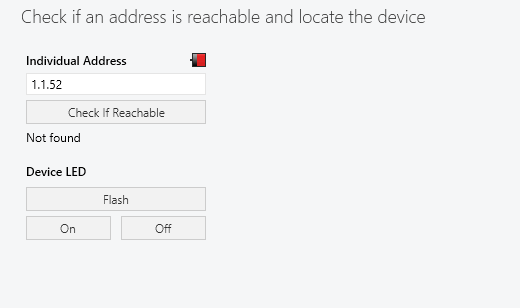
I then performed an Individual Address Check, but no device with the address 1.1.52 was found either (see Screenshot 4).
I really can’t figure out where this phantom device is coming from. Does anyone have any idea why this might be happening or how I can find out where ETS is getting this address from?
Thanks in advance for your help!
0 -
You should perform a line scan in "Monitors". By doing this you can see if there are any devices missing. If there is one device missing in the line scan, then that device might have become the mysterious device 1.1.52. You should also see that 1.1.52 shows up as an "extra" device.
You can then check "Device Info" to see if the 1.1.52 device matches the missing device from the line scan.
0
Commenti
3 commenti
Accedi per aggiungere un commento.