Improvements to Functions-based workflow

Hello!
I'm not happy with the results when creating new Functions and the group addresses that are automatically created.
We need some sort of flexibility, ability to create our own templates etc.
For example, there is only a single "sun protection" type which creates the following 6 addresses which are numbered in sequence:
- Movement
- Step/Stop
- Wind alert
- Rain alert
- blinds position
- slat position
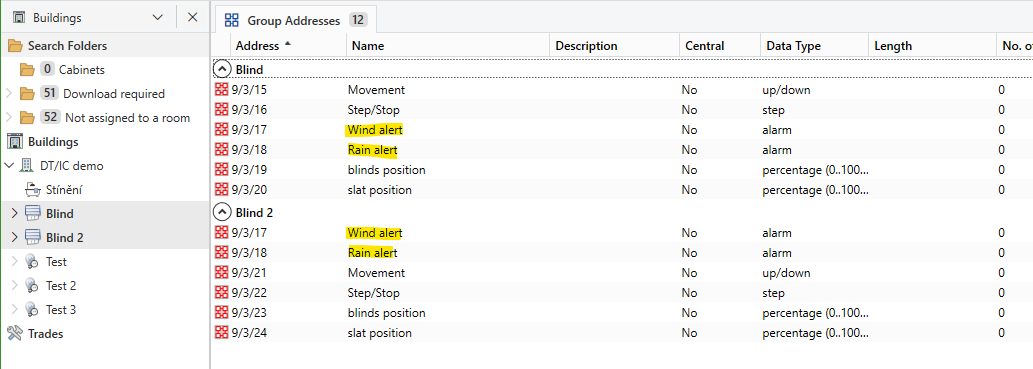
Now if I create another "sun protection" function, it correctly reuses the "Wind alert" and "Rain alert" GAs created with the first sun protection function. (By the way, perhaps these should be marked as "Central" automatically?)
So the order of addresses for the second function looks like this:
- Wind alert
- Rain alert
- Movement
- Step/Stop
- blinds position
- slat position
This immediately illustrates several issues:
- The two alert (alarm) addresses are not created first (as the first step) when creating the first function, which makes the order of GAs inconsistent for the subsequent sun protection functions (see the screenshot at the bottom).
- There is no way to influence the actual group address numbers. They are just appended to the highest address in the project.
No way to set e.g. a specific main group for specific Function types.
No way to place the alert addresses under a different main/middle group (e.g. I like to place my alarms under 0/0/).
No way to say that I want to place my "Movement" addresses at starting address X and the associated "Step/Stop" addresses at X+50 etc. resulting in the following structure (with e.g. X = 2/0/0):
- Blind 1 Movemement 2/0/0
- Blind 2 Movement 2/0/1
- Blind 3 Movement 2/0/2
- …
- Blind 1 Step/Stop 2/0/50
- Blind 2 Step/Stop 2/0/51
- Blind 3 Step/Stop 2/0/52
- …
- Blind 1 Blind Position 2/0/100
- etc.
- There is no way to influence the group address names.
Moreover, the names are inconsistent. Some start with upper-case letters, others start with lower-case letters. Compare: Movement, Step/Stop × blinds position, slat position.
(not to mention they should be Blind (singular) position and Slats (plural) position)
For dimmers: Switching, Status, Dimming, Value × dimming value.
This is inconsistent and not aesthetically pleasing. - Nowadays, 100% of our projects include some sort of visualization so we need to create more group addresses. E.g. I need at least two more addresses for blind/slats positions - to have both set (command) AND status (feedback) addresses.
- On the other hand, we also integrate drapes, shutters etc. without the step/slats functionality, so I want a simple way of tweaking the Function to create only the addresses I need, no more.
- We may want/need to add more addresses for (non-standardized) objects such as movement status, blocking, DALI ECG error status etc.
Similar with HVAC (thermostats). There is so much variety so just having two (switching variable & continuous variable) just isn't cutting it. Different setpoint shift/change object types, different fan speed object types etc.
Please, let us create custom function templates based off the existing standard Functions to give us the ability to create exactly the group addresses we need, assign some meaningful address structure and address names.
Also, please add the ability (option) when deleting a Function, to also delete the associated group addresses (All vs only Non-Central address?)
If you fix these issues, the Function-based workflow will start making much more sense.
Best regards,
Lukáš Polívka
-

I agree. Functions could be a really powerful tool and a useful time saver when configuring KNX installations.
I currently use Functions as containers to hold group addresses that relate to a particular building function. You may have discovered that it is possible to link extra group addresses to the Function. But your suggestion here would be much more useful.1 -
You may have discovered that it is possible to link extra group addresses to the Function.
Yep. Basically what I usually do is create a function, delete the group addresses created with it and then link my own. And then just copy functions without GAs to create more empty functions.
Not sure if it doesn't break the functionality where ETS is able to automatically suggest/link GO-GA connections when using channel-function linking. I'll have to do more tests.
We also need Functions for gates, garage doors, switched wall sockets, door locks etc. Later on, visualization software could use all this metadata do generate UIs easily and automatically just by importing the knxproj.
0 -

I've also posted a couple of messages, but not sure if this is just a waste of time since I'm not sure anybody is really re-acting on this?
0 -

Dear Etienne, for sure not a waste of time. I read all the comments and suggestions here and keep an eye on upvotes and what users agree upon in their discussions here. It is all very valuable to us in making future versions of ETS better aligned with and overcome expectations.
2 -

Michael, could you give any feedback om How this functionality is used today and in what type of projects?
I think it's a great feature, but it seems not to have high focus from developers as the types of supported devices has not been extended much since first release.
Can you share any plans or ideas?
0 -
Dear Mischel,
I kindly ask you to come visit me at our booth at Light + Building 2026 on March 8-13th. I’ll gladly show you and everyone else what we’re working on. Big plans and big improvements coming!1 -
Hi Michael,
Thank you for your feedback. I'm very new to KNX and ETS, but have been doing high end Home Automation for more than 25 years and started when Crestron/Lutron/AMX started. Back then it just felt like spending hours was ok, maybe because I was earning a salary instead of the business. Now I'm older and time is VERY precious for me. Thus using ETS just feels like I'm back in the 2000's. Very time consuming and "old fashion". it feels like in order to provide maximum flexibility for every product, a ton of features and settings are allowed for. However are all of it needed 90% of time?
I did completed a large KNX home (40 odd keypads and about 200 lighting circuits, HVAC, etc.) the other day. It took me probably 10 days programming, including creating multiple scenes, etc.
The same project will take me max 2 days and will include audio and TV zones!
Changing and/or editing lighting scenes are a PITA in ETS.
I see potential with using KNX, but ETS is will need to drastically setup in order to make it really worth it.0
Opmerkingen
7 opmerkingen
U moet u aanmelden om een opmerking te plaatsen.