Two Diagnostics Pane;s

At ETS, we have two Diagnostics panels (shown below):
One through the top main menu of ETS, which is for checking if the project software is fully programmed, off-line from the project network.
One through the drop-down menu of the "panels", which is for checking the actual downloaded project is reacting as required, on-line with the project network.
This brings in confusion, mainly for new Partners ... to resolve this confusion, we suggest keeping only the "diagnostics" panel at the main menu of ETS, and once selected, a choice be given to the Partner, to select from:
- Check the ETS Software
(diagnostic off-line from the network, to insure the ETS software of the project is fully programmed)
- Check the Project Network
(diagnostic on-line with the network, to check the actual correct operation of the downloaded project)

-

Thank god that anyone else brings this to topic.
I suggested some time ago to make the "Diagnostic"-Panel (with Monitors) more accessible and duplicate it as e.g. "Bus Diagnostics" into the Main Menu "Diagnostics".
Like this:
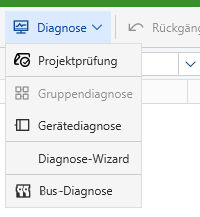
Also rename the Panel in the "All Panels"-Menu from "Diagnostics" to "Bus-Diagnostics". (or another telling name).
The new German name "Monitore" in the Developer BETA 6.4. makes not many sense, because there is much more functionality.
Best regards,
Uwe Engling3 -
Here is the link to the previous request:
2
Σχόλια
2 σχόλια
Πραγματοποιήστε είσοδο για να αφήσετε ένα σχόλιο.